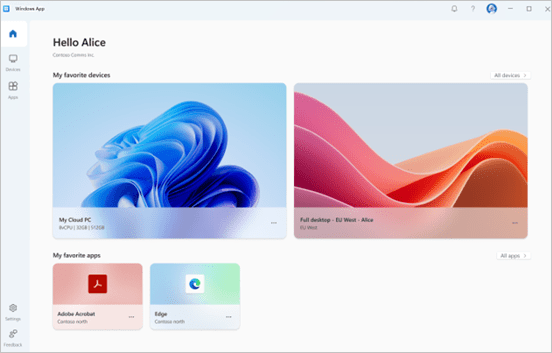
Today is all about the Windows app going GA soon, as per this announcement from Microsoft:
Windows App general availability coming soon | Windows IT Pro Blog (microsoft.com)
In this post, I want to focus on the iOS, iPadOS and macOS release. So what to consider?
Do you already deploy today one of those apps via ABM(Apple Business Manager – formerly known as VPP) via Intune and do not prevent automatic update in your Intune assignement?
- Microsoft Remote Desktop (macOS)
- Remote Desktop Mobile (iOS/iPadOS)
In case your answer is yes and you never heard of the Windows app, I strongly recommend to get familiar with it ASAP. This great article gives you everything you need to get familiar with it and start testing:
Get started with Windows App to connect to devices and apps – Windows App | Microsoft Learn
Great, let’s move on. Since Microsoft is planning to replace the existing apps instead of publishing the Windows app in addition, you and your users will experience the current Microsoft Remote Desktop(macOS)/Remote Desktop Mobile(iOS/iPadOS) apps to be updated automatically on their devices and to become the Windows App instead soon.
Microsoft says: “Users on iOS and macOS will experience an in-place update of the Remote Desktop client to the new Windows App version. This update will provide the same modern UX and additional functionalities, ensuring that there are no disruptions to business continuity. It will be available through the Apple app store for iOS and macOS.”
While I personally would recommend to keep that exactly this way, you may want to take more control over the rollout and prepare your users for the change. To do so, change your current assignment of the mentioned apps to prevent automatic updates:
In your Intune console, go to Apps->iOS/iPadOS(or macOS) and look for your already imported Remote Desktop Mobile/Microsoft Remote Desktop App. Select the app and go to Properties. Select „Edit“ in the „Assignments“ area.
Change your current assignment as follows:
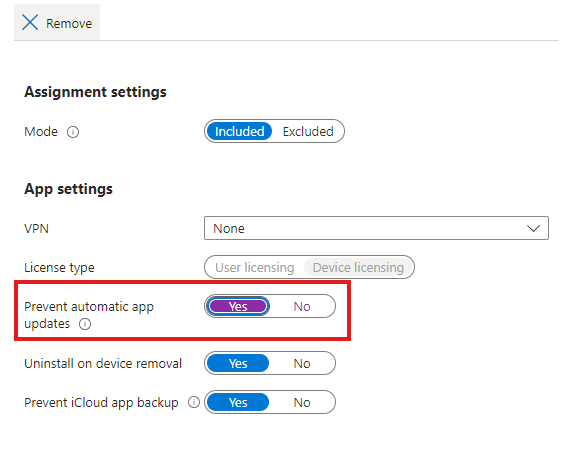
Make sure to save your assignment change.
Note! This change will only prevent the Remote Desktop app to update on devices already installed. Whoever gets the app installed as “required” or get it form Company Portal via the “available” method, will receive the latest published version of this App on the public Apple AppStore.
This also means that at the day when Microsoft replaces the app on the AppStore (we already learned in the beginning, that Microsoft is not planning to have the new Windows App and the Remote Desktop Apps to be available simultaniously on the AppStore), everyone who gets a new installation, will automatically get the Windows app instead of the Remote Desktop Mobile/Microsoft Remote Desktop apps.
Conclusion
I really love that Microsoft pays high attention to unify the end-user experience, bringing all virtualization related solutions to single, centralized and user-centric app.
Even we have the ability to gain some more time by preventing autoamtic app updates, I wouldn’t recommend to make use of it. Enabling automatic updates not only enhances your security posture, it also saves valuable time on the admin side, since we always know people use the latest available version of the app.
Instead of spending time to prevent automatic updates, I’d recommend to prepare by making yourself familiar with the new Windows app and drive a good, structured communication to your end-users and enjoy the all new Windows App.





Leave a Reply